Salesforce Data Migration
Salesforce Data Migration Services
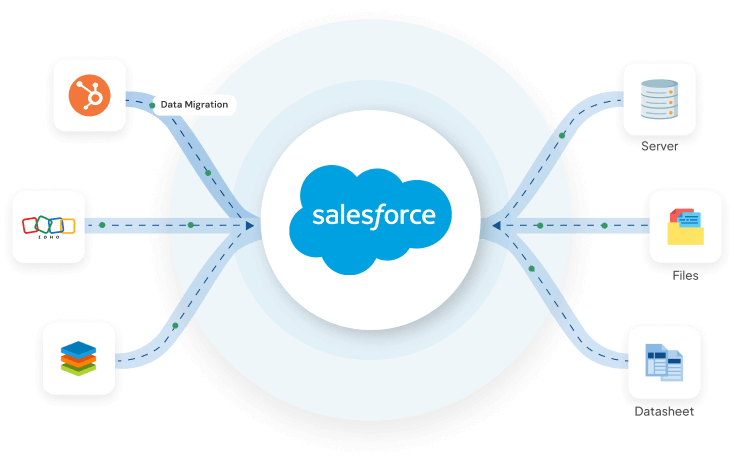
Cloud Analogy helps businesses migrate data from CRMs, legacy systems, spreadsheets, databases, and other Salesforce orgs into Salesforce. Our team handles data assessment, cleansing, mapping, transformation, migration, and validation to help maintain data quality and business continuity.
Reliable Salesforce Data Migration With Cloud Analogy
Our Salesforce data migration services help businesses move data from existing CRMs, legacy systems, spreadsheets, databases, and other Salesforce orgs into Salesforce. We assess, cleanse, map, transform, migrate, and validate data while considering object relationships, data quality, and business requirements.
Ready to Start Your Salesforce Data Migration?
Talk to our Salesforce data migration specialists about your source systems, data volume, migration requirements, and Salesforce environment. Weโll help you plan a structured migration focused on data quality, validation, and business continuity.
Common Salesforce Data Migration Challenges and Solutions

Challenges

Complex Data Structures and Relationships

Large Data Volumes

Poor-Quality, Duplicate, or Incomplete Data

Insufficient Testing and Validation

Migration Sequencing and Dependencies
Our Solutions

Map objects, fields, dependencies, and relationships before migration to determine the correct migration sequence and preserve data integrity.

Use a controlled migration approach, starting with a representative data set in a sandbox before processing the full data volume.

Clean, deduplicate, standardize, and validate source data before migration to reduce errors and improve data quality in Salesforce.

Run test migrations in a sandbox and validate record counts, field values, relationships, and migration errors before production deployment.

Load related objects in a logical order and use appropriate IDs or external IDs to preserve relationships between parent and child records.
Salesforce Data Migration Services We Offer
Legacy System & Third-Party Migration
Migrate data from legacy systems, databases, spreadsheets, and third-party platforms into Salesforce with appropriate data mapping and validation.
CRM Migration to Salesforce
Move customer and business data from existing CRM platforms into Salesforce while preserving relevant records, fields, and relationships.
Classic to Lightning Experience Migration
Migrate Salesforce Classic data and configurations to Lightning Experience while reviewing layouts, fields, automation, and related dependencies.
Salesforce-to-Salesforce Data Migration
Migrate data between Salesforce orgs while preserving relevant records, relationships, and data integrity.
Data Mapping and Transformation
Map source fields to Salesforce objects and fields, then transform data to match the target structure and business requirements.
Post-Migration Support
Validate migrated data, resolve post-migration issues, and support your team after the Salesforce migration goes live.
Our Approach To Data Migration Success
Review Current Data
Evaluate data quality, structure, relationships, source systems, and migration requirements before the migration begins.
Identify Data for Migration
Determine which records and objects to migrate, exclude unnecessary data, and define the appropriate migration sequence.
Prep Data for Migration
Clean, deduplicate, standardize, and transform source data to meet Salesforce requirements and business rules.
Execute Data Migration
Migrate prepared data into Salesforce using a controlled process while maintaining required relationships and data integrity.
Validate Migrated Data
Verify record counts, field values, relationships, completeness, and migration errors after the data is loaded.
User Adoption & Support
Provide training and post-migration support to help users work effectively with the migrated data.
Cloud Analogy Cloud-Driven Salesforce Consulting Expertise
With our deep knowledge & rich experience across the different Salesforce clouds, we ensure you get the most out of each cloud’s capabilities and add value to the business.


Why Choose Cloud Analogy For Salesforce Data Migration Services?
Controlled Migration & Testing
Reliable Data Migration
Our Results Tell The Story
Cloud Analogy has made a significant impact on our business success. Cloud Analogy helped our company to transform for good and supported us in implementing, customizing, and upgrading the organization's reputation. The work delivered was fantastic, the way I structured and wanted it to be, and it was according to my expectations. They managed the job well, and I am impressed with how Cloud Analogy and the team got the project done on the given deadlines.
Jonathan Matal Renovo Financial

Ready to Start Your Salesforce Data Migration?
Talk to our Salesforce data migration specialists about your source systems, data volume, migration requirements, and Salesforce environment. We’ll help you plan a structured migration focused on data quality, validation, and business continuity.
Frequently Asked Questions
Salesforce data migration is the process of moving business data from a source system, such as a legacy CRM, spreadsheet, database, or another Salesforce org, into a Salesforce environment. The process typically involves assessing and cleaning the source data, mapping fields and relationships, transforming data where needed, loading it into Salesforce, and validating the migrated records. The exact approach depends on the source system, data volume, Salesforce objects, and migration requirements.
Cloud Analogy supports Salesforce data migrations from CRMs, legacy systems, spreadsheets, databases, and other Salesforce organizations. Depending on the project, this can include CRM-to-Salesforce migration, Salesforce-to-Salesforce migration, legacy data migration, Classic-to-Lightning migration, data mapping and transformation, and related migration support. The migration approach is tailored to the source system, Salesforce environment, data structure, and business requirements.
A typical Salesforce data migration follows six stages: assess the existing data, identify what needs to be migrated, clean and prepare the data, map and transform fields, load the data into Salesforce, and validate the results. Migration teams may also run a pilot migration in a sandbox before moving production data. The sequence can vary depending on the objects, relationships, data volume, and source systems involved.
Before migration, data should be reviewed for duplicates, missing values, inconsistent formats, outdated records, and fields that are no longer required. The data is then cleaned, standardized, and mapped to the appropriate Salesforce objects and fields. It is also important to preserve identifiers and relationships where they are needed for the migration. Salesforce recommends testing a small import first to identify data or mapping issues before a larger import.
Salesforce data migration should be tested in a controlled environment before the production migration. Validation can include comparing record counts, checking field values and relationships, reviewing required fields, testing migrated records, and confirming that relevant automations and integrations work as expected. For Salesforce-to-Salesforce migrations, Salesforce also recommends testing the migration in a sandbox and validating the imported data after the migration.
Salesforce provides several options for moving data, including Data Import Wizard and Data Loader. Data Import Wizard is suited to supported objects and smaller imports, while Data Loader is designed for larger volumes, more complex mappings, and additional operations such as export, update, upsert, and delete. The appropriate tool depends on the objects, record volume, data structure, and migration requirements.
Salesforce-to-Salesforce data migration involves moving records from one Salesforce organization to another. It may be required when consolidating orgs, moving to a new Salesforce environment, restructuring an organization, or replacing an existing org. The target org needs to be prepared before migration, and records should be loaded in a logical sequence so relationships between objects can be recreated correctly.
The timeline depends on the amount and quality of data, number of Salesforce objects, source systems, field mappings, data transformation requirements, integrations, testing, and deployment approach. A smaller migration may take several weeks, while complex migrations involving multiple systems or large datasets can take considerably longer. A reliable timeline can be established after the source data and migration scope have been assessed.
Salesforce data migration costs vary based on data volume, source systems, number of objects, data quality, transformation and mapping requirements, integrations, testing, and the level of migration support required. A straightforward CRM migration may require less effort than a complex migration involving multiple systems, large datasets, custom objects, or extensive data cleansing. A migration assessment is usually needed to provide an accurate project estimate.
Common challenges include poor-quality or duplicate data, complex object relationships, inconsistent field structures, large data volumes, incorrect field mappings, and insufficient testing. Migration teams also need to consider record ownership, dependencies, integrations, and the order in which related objects are loaded. Addressing these issues during planning and sandbox testing can reduce errors during the production migration.
Legacy data migration is the process of moving relevant historical or operational data from an older CRM, database, spreadsheet, or other legacy system into Salesforce. Before migration, the source data is typically assessed and cleaned to determine what should be retained, transformed, archived, or excluded. The goal is to bring useful data into Salesforce without carrying unnecessary or poor-quality records into the new environment.
Cloud Analogy supports Salesforce data migration across data assessment, cleansing, mapping, transformation, migration, validation, and post-migration support. Our approach is based on the source system, Salesforce environment, data relationships, and business requirements rather than treating migration as a simple file transfer. We also help businesses plan testing and validation to reduce data-quality issues during the transition.
Cloud Analogy exceeded my high expectations. Their seamless and user-friendly approach to implementing Zoho CRM impressed me. They were transparent, accommodating, and patient throughout the process, making numerous changes without hassle. They explained everything clearly, ensuring we were on the same page. In the end, they delivered the desired solution. Working with Cloud Analogy was straightforward and satisfying. I highly recommend their professional and customer-centric services. Thank you, Cloud Analogy, for your outstanding support!.
Deepika Ramnath Solar Link Australia